
The shared list app for couples and households.
Roost is the shared list app that goes beyond shopping. One list for groceries, another for films with poster art, books with covers, restaurants to try, TV shows, gift ideas and more, all synced in real time across both phones.
Get started free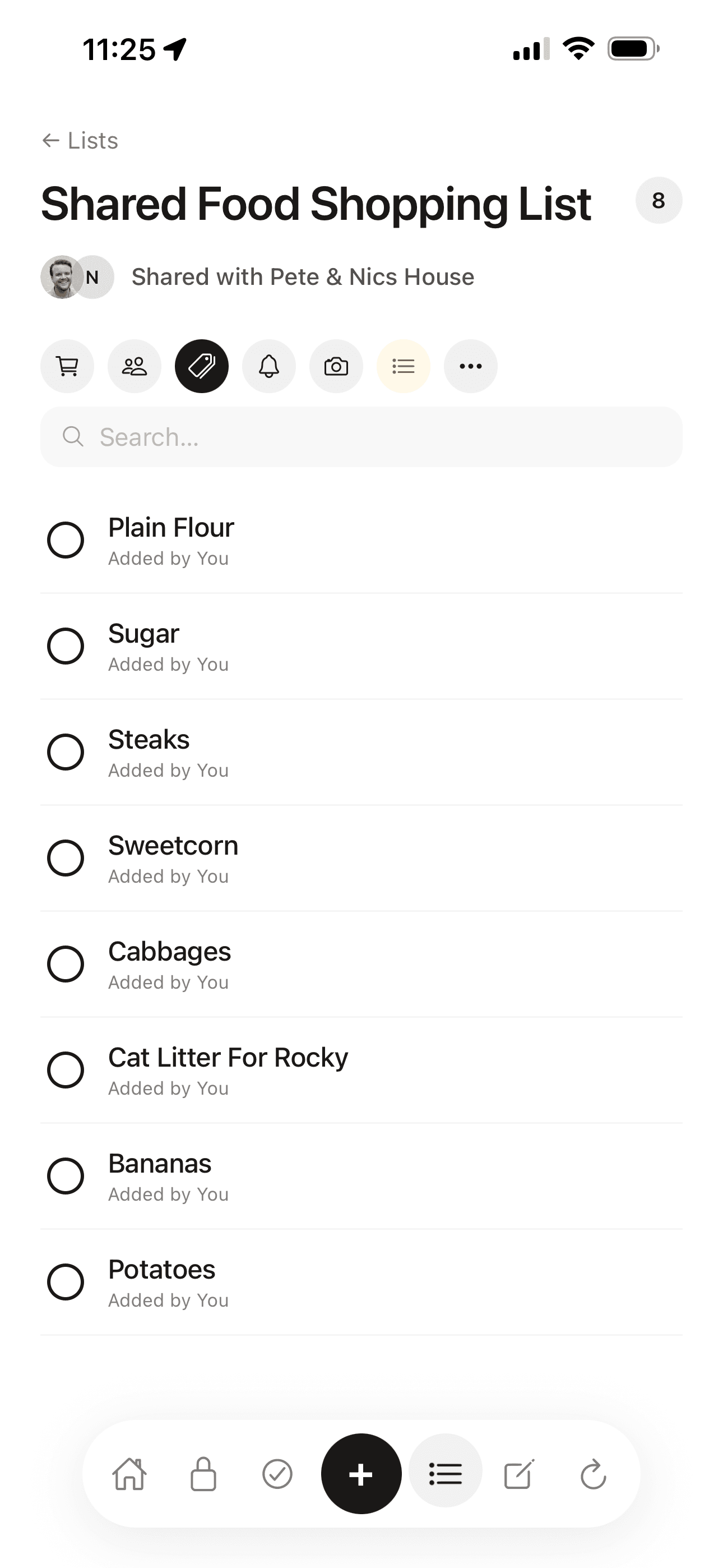
What makes a good shared list app
Most apps people use for sharing lists are just shared notes. They work, but they are not built for the job. A grocery list in a shared note has no tap-to-check, no indication of who added each item, and no way to clear completed items after a shop without deleting the whole list.
Roost designs every list type for its specific job. The shopping list has tap-to-check items, shows who added each item, and handles clearing after shopping cleanly. The film list auto-fetches poster art. The book list shows cover images. Each list does exactly what it should rather than approximating it with a generic to-do format.
Real-time sync is non-negotiable. Add something on your phone and your partner sees it within a second, not on next refresh, not the next time they open the app. Tick an item off at the supermarket and it is immediately ticked on their screen too.
Real-time sync
Changes appear on the other person's phone within a second. No manual refresh.
Who added what
Every item shows who added it. No more mystery items or duplicate adds.
Purpose-built lists
Shopping, films, books, restaurants: each list is built for its specific job.
Cover art and posters
Film, book and record lists automatically fetch cover art from global databases.
Star ratings
Rate films, books and restaurants after you've watched, read or been.
Free to share
Sharing is included in the free plan. Both people can add, edit and tick.
Every list type your household needs
Eleven built-in list types, plus custom. Each one is designed for its specific use.
Shopping
Quick-add, tap to check, real-time sync. Shows who added each item.
Films
Auto-fetches movie posters. Star ratings. Want/watched status.
TV shows
Track what you're watching together. Poster art included.
Books
Cover art auto-fetched. Reading status and star ratings.
Records
Album cover art. Rate what you've listened to.
Restaurants
Places to try, with ratings after you've been.
Places to visit
A shared travel wishlist.
Gift ideas
Per-person gift tracking. Private or shared.
Recipes
Recipes to cook. Add from anywhere.
Wines
A wine log with ratings.
Custom
Create any list you need with a name of your choice.
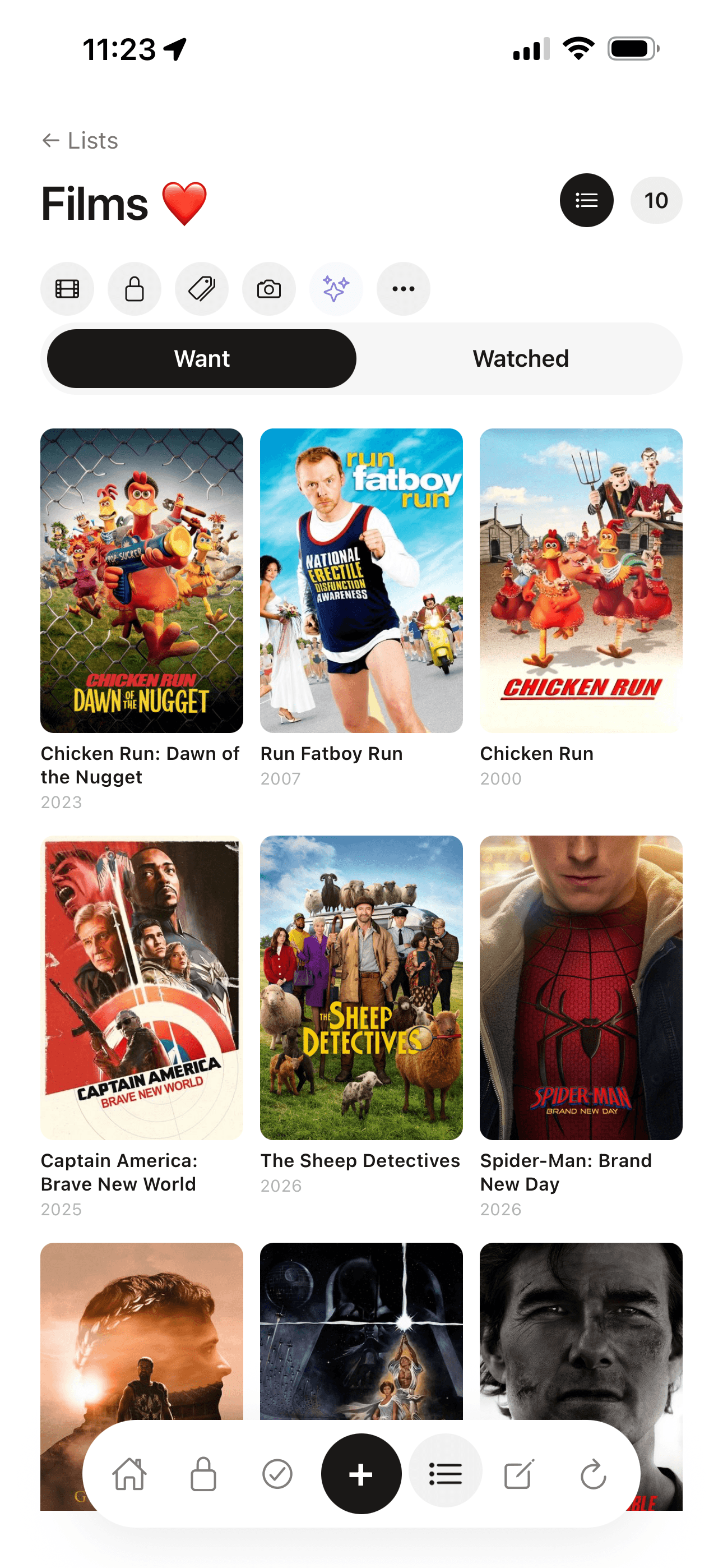
Films, books and records with cover art
Add a film you want to watch and Roost auto-fetches the movie poster from a global database. Mark it watched. Leave a star rating. Both people can add and rate. It is a shared list in the true sense, not one person's collection that the other can view.
Books work the same way. Cover art is fetched automatically, reading status is tracked, star ratings are per person. Records show album art. Restaurants have a two-column view: places to try and places you've been.
It looks like a media app. It works like a home organiser. They are the same thing in Roost.
Common questions
What is the best shared list app for couples in the UK?
Roost is built for UK couples and households. The shopping list updates in real time across both phones. Items show who added them. Beyond shopping, you can share film lists with poster art, book lists with covers, restaurant wishlists, TV shows and more. All in the same app.
How does the shared shopping list work in Roost?
Add an item on your phone and it appears on your partner's within a second. Tick an item off in the supermarket and they see it ticked immediately. Items show who added them so there's no confusion about what's already in the basket. The list clears completed items automatically after a shop.
Can I share a film or book list with my partner?
Yes. Roost film lists auto-fetch movie poster art from a global database. Book lists pull in cover images. Both people can add titles, mark things as watched or read, and leave star ratings. It works like a proper media tracking app, and it lives inside your household organiser.
Is the shared list app free?
Yes. Household list sharing in Roost is included in the free plan, and both people can add, edit and tick off items across all list types. The free plan allows up to 10 lists. The Pro plan at £5.99/month removes the limit.
Does the shared list update in real time?
Yes. Roost uses Supabase Realtime to sync list changes across all household devices within a second. There is no manual refresh or 'send to partner' step. When you add or tick off an item, the other person sees it immediately.
What types of shared lists does Roost include?
Roost includes dedicated list types for shopping, films (with auto-fetched poster art), TV shows, books (with cover art), records, restaurants, places to visit, gift ideas, recipes, wines, and a custom list type for anything else. Each list type is purpose-built, not a generic to-do list dressed up.
How is Roost different from a shared notes app for lists?
Most notes apps let you share a note that can function as a list, but they are not built for it. Roost's shopping list has tap-to-check items, shows who added each item, and clears completed items after shopping. The film list auto-fetches poster art. The book list shows cover images. Purpose-built list types are faster and more pleasant to use than a plain shared note.
Related reading
Best shared shopping list app for couples UK (2026)
How Roost compares to Any.do, TickTick, Apple Reminders and Google Keep for shared shopping lists.
Roost for couples and households
How household sharing works in Roost: vault, lists, routines and renewals all shared in real time.
The mental load: why one person ends up remembering everything
Shared lists are one practical step toward getting household information out of one person's head.
Moving in together? The unromantic admin checklist
The practical admin nobody talks about when you move in with someone, and what to set up together from day one.
The only shared list app that covers your whole household.
Free to start. Sharing included. No card required.
Get started free