
The to-do list your household will actually keep.
A proper task manager, not a checklist bolted onto something else. Built for the person who already runs a system and will not move to something weaker.
Five buckets, and nothing to configure.
Every task lives in one of five places. You do not build a system, you just put things where they go.
Inbox
Anything untriaged. Get it out of your head, sort it later.
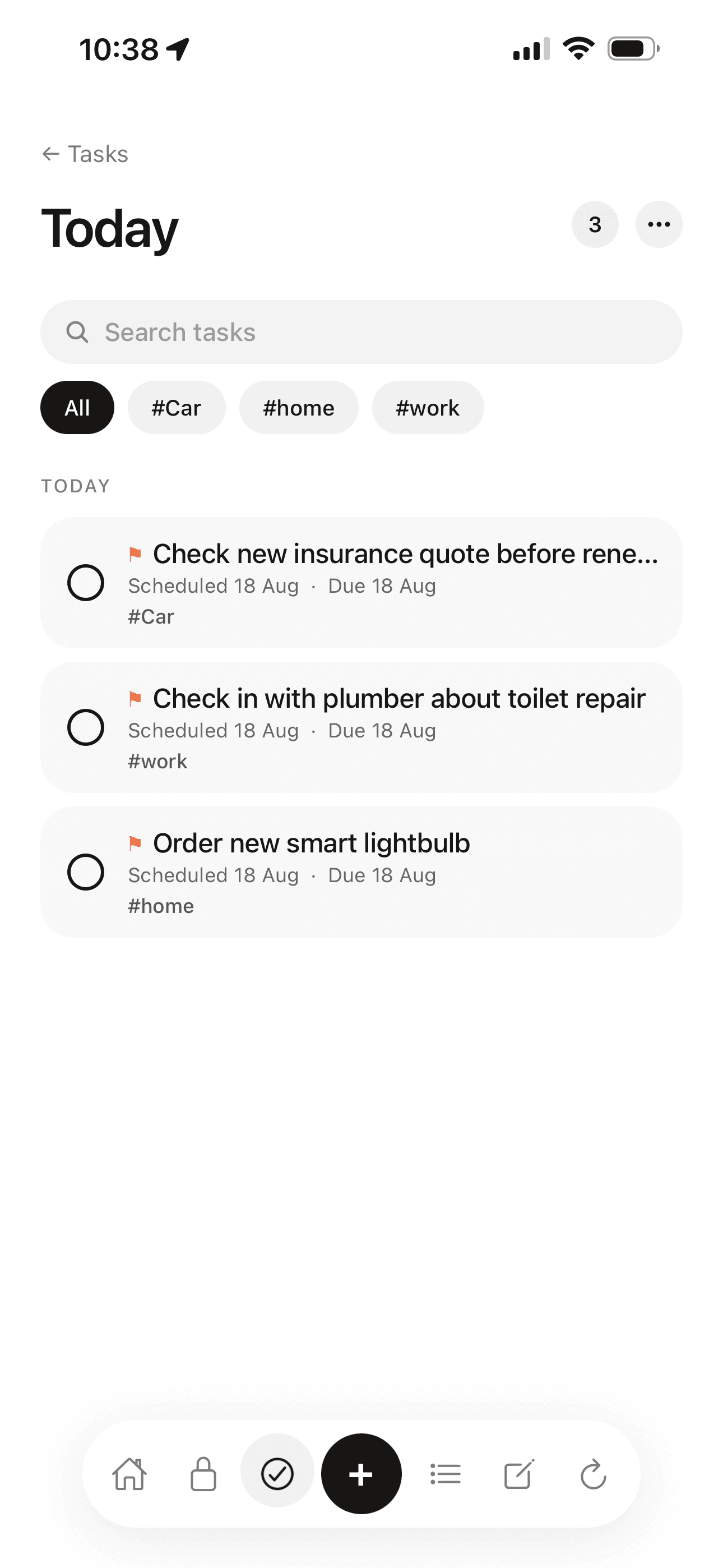
Today
What you have actually committed to today.
Upcoming
Dated, but not yet. It will surface on the day.
Someday
No date, and not forgotten either.
Logbook
Done, and kept, so you can see what you got through.
When you plan to do it, and when it must be done.
These are different things, and most apps only hold one of them. Roost holds both: a scheduled date for your plan, a deadline for the hard stop.
Renew the insurance is scheduled for Saturday. The deadline is the 22nd. If Saturday slips, the deadline has not moved, and Roost still knows.
Renew the car insurance
Admiral, £72.50/mo
Repeats that understand real life.
Repeat from the schedule
Bin day is Tuesday whether or not you did it last Tuesday. Weekly jobs hold their weekday however late you tick them off.
Repeat from completion
The boiler service is a year after the last one, whenever that actually was. Ticking late pushes the next one back, which is the whole point.
Plus the rules real life needs: specific weekdays, day of the month, last day of the month, and Nth weekday, so “first Monday” and “last Friday” both work.
Shared tasks, with someone actually on them.
Share a task with your household and both of you see it, edit it and can tick it off. Give it an assignee picked from your household members so it is clear whose it is.
When you need eyes on something, the nudge button sends a push that opens straight onto the task. One tap, no message to compose, no nagging text.
Everything else, briefly.
Four priority levels
None, low, medium and high, with a colour on the row so you can see it at a glance.
Subtasks
One level, on purpose. Enough to break a job down, not enough to build a project plan.
Tags and projects
One tag set across all five sections. A project gathers tasks, lists, notes, vault items and routines about one thing.
Reminder times
A default set once in your profile, and a per-task time when something needs its own.
Linked vault items
A task can point at the insurance policy or appliance it concerns, so the details are one tap away.
Scan a written list
Photograph a handwritten to-do list and it becomes real tasks. You confirm which ones to keep.
66 task templates, so you start with something.
Register to vote. Chase a repair with the landlord. Get a cheaper energy deal. Cancel a subscription. Review your standing orders. Real jobs, already written.
Common questions
What is the best shared to-do list app for couples in the UK?
Roost is built for households rather than teams: both people see and edit the same shared tasks, with no owner or admin hierarchy and no read-only second seat. It also sits alongside a vault for insurance and vehicle details, shared shopping lists and home maintenance routines, so a task can link to the thing it concerns. Free on iOS and web with 10 tasks, then £5.99 a month for unlimited.
Can I assign tasks to my partner?
Yes. Shared tasks take an assignee picked from your household members. There is also a nudge button that sends the other person a push notification opening straight onto the task, so you do not have to compose a reminder text.
Does Roost handle recurring tasks like bin day?
Yes, and it handles the two kinds separately. Repeat from the schedule keeps a weekly job on its weekday however late you tick it, which is what bin day needs. Repeat from completion counts forward from the day you actually did it, which is what a boiler service needs. Roost also supports specific weekdays, day of the month, last day of the month and Nth weekday rules.
Is the task manager free?
Yes. The free plan includes 10 tasks with every feature switched on: deadlines, repeat rules, subtasks, priorities, tags, assignees and reminders. Nothing is held back for Pro except the item limit itself.
Can I link a task to an insurance policy or appliance?
Yes. Any task can point at the vault item it concerns, so “renew the car insurance” sits against the policy with its provider, renewal date and claims number. The details are one tap away rather than in another app.
Does Roost have a calendar view?
No. Roost has no calendar or scheduling feature and does not sync with one. Tasks are organised into Inbox, Today, Upcoming, Someday and Logbook, with a scheduled date and a separate deadline where you need them.
Get it out of your head.
Ten tasks free, every feature switched on, no card. Sorted in an evening.
Start freeNext: how sharing works for two people or notes that live on the thing they are about.