
It knows your renewals because they are your renewals.
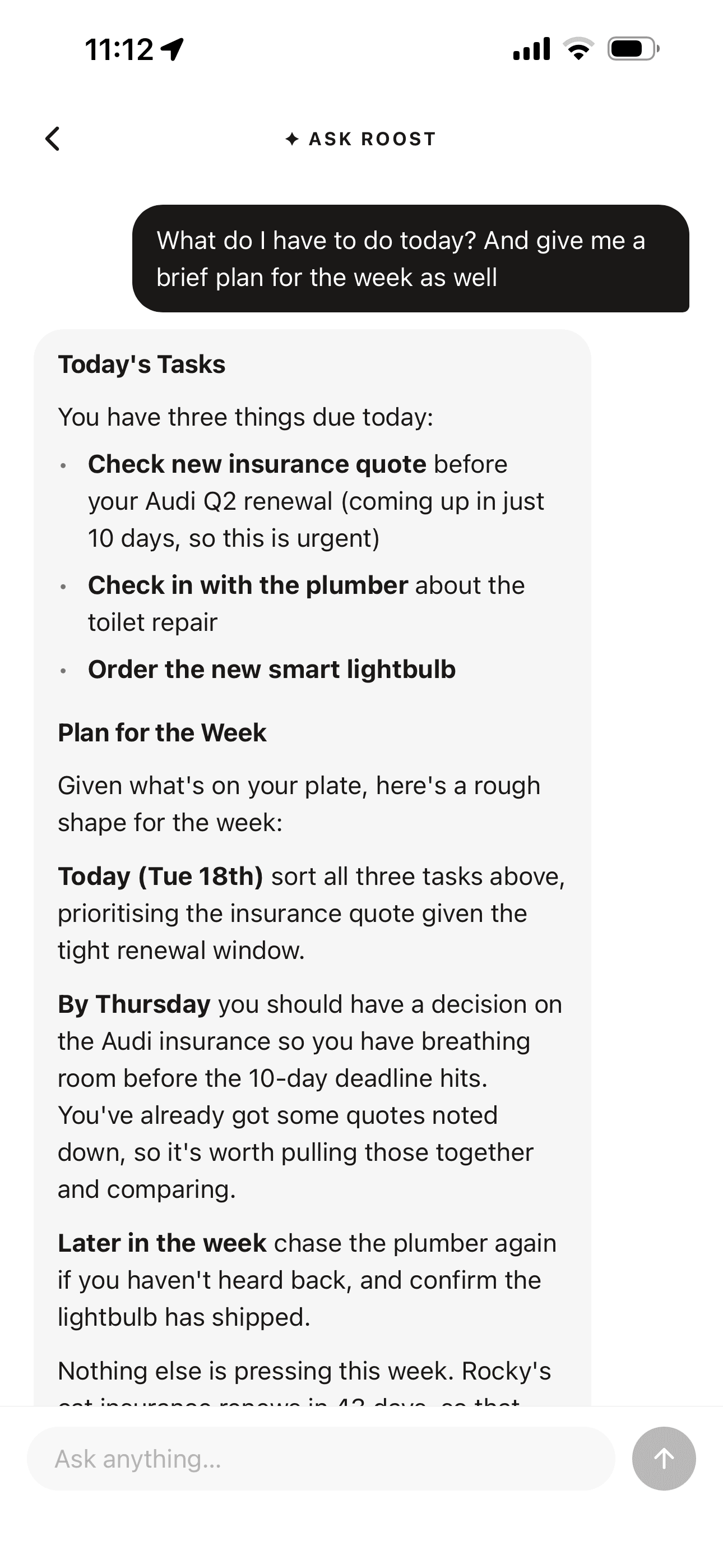
Most assistants answer in general. Roost's answers come from your actual data: your open tasks, your upcoming renewals, your overdue routines.
Ask when the boiler cover renews and it tells you, because it can see the vault item. And nothing happens without you: every suggestion ends in something you confirm.
Start freePoint your camera at it. Sorted.
Photograph a wine label and the list item fills itself in, cover art included. A film poster, a book cover, a recipe: 23 list types work this way.
Photograph a handwritten to-do list and it becomes real tasks. Photograph an insurance document and the vault wizard completes itself.
You check it, you confirm it, done.
The one that pays for itself.
When renewals are coming up, Roost reads what they actually cost and suggests two or three specific ways to save, most expensive and most imminent first.
Drawn from your own renewals, not generic advice about shopping around. The Renewals screen also carries a running monthly total across everything you hold, which is the number most people are surprised by.
The quieter ones.
Today's three
Picks three tasks worth doing today from your week, each with a reason in under eight words.
Shopping by aisle
Regroups an open shopping list into British supermarket sections, so one walk round the shop does it.
Build my routines
Describe your home in a sentence and it proposes routines with sensible cadences. You pick which to keep.
Note summaries
Reduces a long note to a handful of bullets, or pulls the actions out of it into real tasks.
List suggestions
Reads what is on a list and suggests five more in the same spirit, never repeating what is there.
Vault briefing
Two or three short insights on the vault hub, drawn from what is renewing soonest and what it costs.
A nudge, not a badge
When routines slip, one warm sentence about them rather than a red number and a count.
Household summary
A short overview of what your household is managing together, from your shared items.
What it does not do.
None of this writes for you. None of it invents content. It reads what you have already put in, and it hands you something to confirm.
That is the whole design.
What actually leaves your phone.
Your private items are encrypted on your device and Roost cannot read them at rest. When you ask a question, the titles and dates relevant to it are unlocked on your phone and sent to answer that one question. Names, renewal dates and costs. Never the contents of your notes.
Roost keeps none of it. We record which feature was used and what it cost to run, and nothing else, not even which account asked. The app says all of this the first time you open Ask Roost, rather than burying it here.
How Roost protects your dataCommon questions
What can I ask Roost?
Anything about what you have already put in. When does the boiler cover renew. What is overdue. What should I tackle today. Any renewals this month. It is handed your open tasks, upcoming renewals with their costs, overdue routines and recent note titles before it answers, so it responds about your actual life rather than in general.
Does Ask Roost see my private items?
Your private items are encrypted on your device and Roost cannot read them at rest. When you ask a question, the titles and dates relevant to it are unlocked on your phone and sent to answer that one question: names, renewal dates and costs, never the contents of your notes. Roost keeps none of it. We record which feature was used and what it cost to run, and nothing else, not even which account asked. The app explains this the first time you open Ask Roost.
Does the camera scanning work on documents?
Yes. As well as film posters, book covers, wine labels and recipes across 23 list types, it reads a handwritten to-do list into real tasks, and pulls details off a document to complete the vehicle, insurance, appliance and subscription vault forms. You check what it found before anything is saved.
Do I have to use any of this?
No. Every one of these is optional and none of them run on their own account. Roost works exactly the same if you never open Ask Roost or scan anything.
What are all the AI features in Roost?
Twelve, all optional: Ask Roost, the renewal savings briefing, today's three tasks, shopping grouped by supermarket aisle, the routine builder, the overdue routine nudge, note summaries, note action extraction, list suggestions, the vault briefing, the household summary, and camera scanning.
Does Roost write my notes or tasks for me?
No. Nothing in Roost writes content for you or invents anything. Every feature reads what you have already put in and hands you something to confirm before it is saved.