
A home filing system is a single, organised place where both the physical originals and the key reference information for your household's important documents are stored and easy to find. Most households do not have one. They have a junk drawer and an email inbox. A working home filing system means you can find your insurance policy number, your boiler service record, or your passport expiry date in under a minute. Roost's vault is the digital half of that system, shared across your household so both people can access what they need.
What documents should a home filing system cover?
A good home filing system covers every document you might need urgently, every document with an expiry date, and every document containing a reference number you would need in an emergency. Here is a breakdown by category:
| Category | What to keep | Why it matters |
|---|---|---|
| Insurance | Home, car, life, pet, travel policies | Policy number and claims line needed immediately after an incident |
| Vehicle | MOT certificate, V5C, service history, breakdown cover | MOT date, garage contact, cover level needed for renewals and emergencies |
| Property | Mortgage offer, tenancy agreement, gas and electrical safety certs | Reference numbers, landlord contacts, and legal obligations |
| Utilities | Energy supplier, broadband provider, water account | Account numbers, contract end dates, emergency numbers |
| Appliances | Boiler, washing machine, fridge, oven warranties | Warranty end dates, model numbers, manufacturer service lines |
| Identification | Passport, driving licence, NI number, birth certificate | Expiry dates, renewal schedules, and proof of identity requirements |
| Financial | Bank accounts, pension providers, investment accounts | Account references, provider contacts, and nominated beneficiaries |
The rule of thumb: if you would need to find this information at short notice, in a stressful situation, while possibly on the phone to someone who is waiting for an answer, it belongs in your document system. If you would never need it urgently and it has no expiry date, it probably does not.

Digital or physical: which works better for a home filing system?
The honest answer is that you need both, but with different roles. Physical originals are necessary for a small number of documents: your passport, birth certificate, property deeds, and anything that requires a wet signature or an embossed seal. These should be kept in one place, clearly labelled, that everyone in your household knows about.
Digital storage is better for everything else. It is searchable, accessible when you are not at home, and easier to share with a partner or family member who needs the same information. Most important documents now arrive by email, which makes digital storage the natural default. The problem with relying on email alone is retrieval: searching your inbox for “policy document” across several years of correspondence is not a system.
A dedicated app or shared folder solves the retrieval problem by giving you a structured place to look. The key distinction is between storing the PDF of a document and storing the reference information it contains. When your boiler engineer asks for the model number, or your insurer asks for your policy reference, you do not need the full document. You need the number. Store the reference information separately, and you can find it in seconds from your phone.
7 steps to set up your home filing system
These seven steps take most households from a junk drawer to a working home filing system in an afternoon. You do not need special software or a filing cabinet. You need a consistent approach and somewhere to store the key information.
1. Start with a clear-out
Gather everything: every drawer, every folder, every email attachment. Put it all in one place. The goal at this stage is not to organise. It is to know what you have. Most households discover that a significant proportion of what they have been keeping is no longer relevant: expired warranties, policies from previous addresses, utility bills from suppliers they no longer use.
2. Decide what to keep
Apply the retention rules in the “how long to keep documents” section below. Shred anything that is expired, no longer your responsibility, or that you could recreate from your insurer or bank in five minutes. UK households typically find they can discard around half of what they have been keeping once they apply clear retention guidelines.
3. Separate originals from reference information
Physical originals (passport, birth certificate, property deeds) go in one folder or box. Everything else: extract the reference information and store it digitally. Policy number, insurer name, renewal date, claims number, and the emergency contact for each item. That reference information is what you actually need day-to-day. The PDF is what you need rarely, if ever.
4. Choose the digital home for your system
Pick one place for your reference information and use only that. Options include a shared notes app, a spreadsheet, a dedicated household admin app, or a well-structured Google Drive folder. What matters most is that it is accessible from your phone, shareable with your household, and simple enough that you will keep it up to date. The more friction involved in adding something to your home filing system, the less likely it is to get added.
5. Organise by category, not by date
Filing by date makes things hard to find later. A home filing system organised by category is far easier to use: one section or folder for insurance, one for vehicles, one for property, one for utilities, one for appliances, one for identification, one for finance. Within each category, one entry per item. This mirrors how you actually look things up: not “what did we get in April 2023?” but “where is our home insurance policy number?”
6. Add renewal dates to a shared calendar or renewal tracker
Renewal dates are the time-sensitive part of your document system. An insurance policy that auto-renews without you checking alternatives costs money. A passport that expires before a trip costs significantly more. Add every renewal date and expiry date to a shared calendar or a renewal tracking app when you set up each entry, not as a separate task to do later.
7. Review once a year
A document system gets stale quickly. Insurers change, addresses change, account numbers change. Set a recurring reminder to review your system once a year, update anything that has changed, and remove anything that is no longer relevant. One hour once a year is enough to keep most households current.
Here is what the digital half of a home filing system looks like when it is set up and in use:
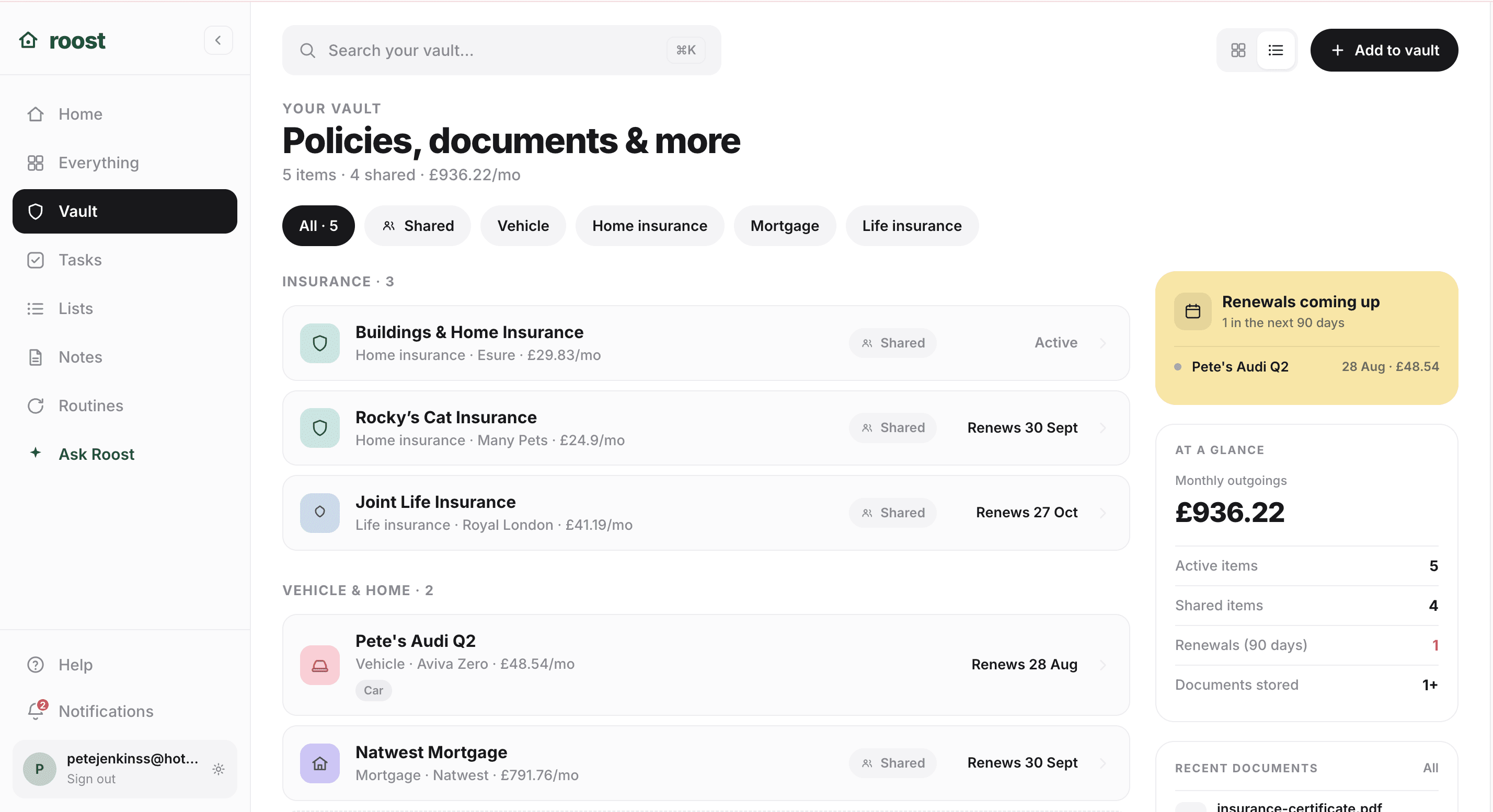
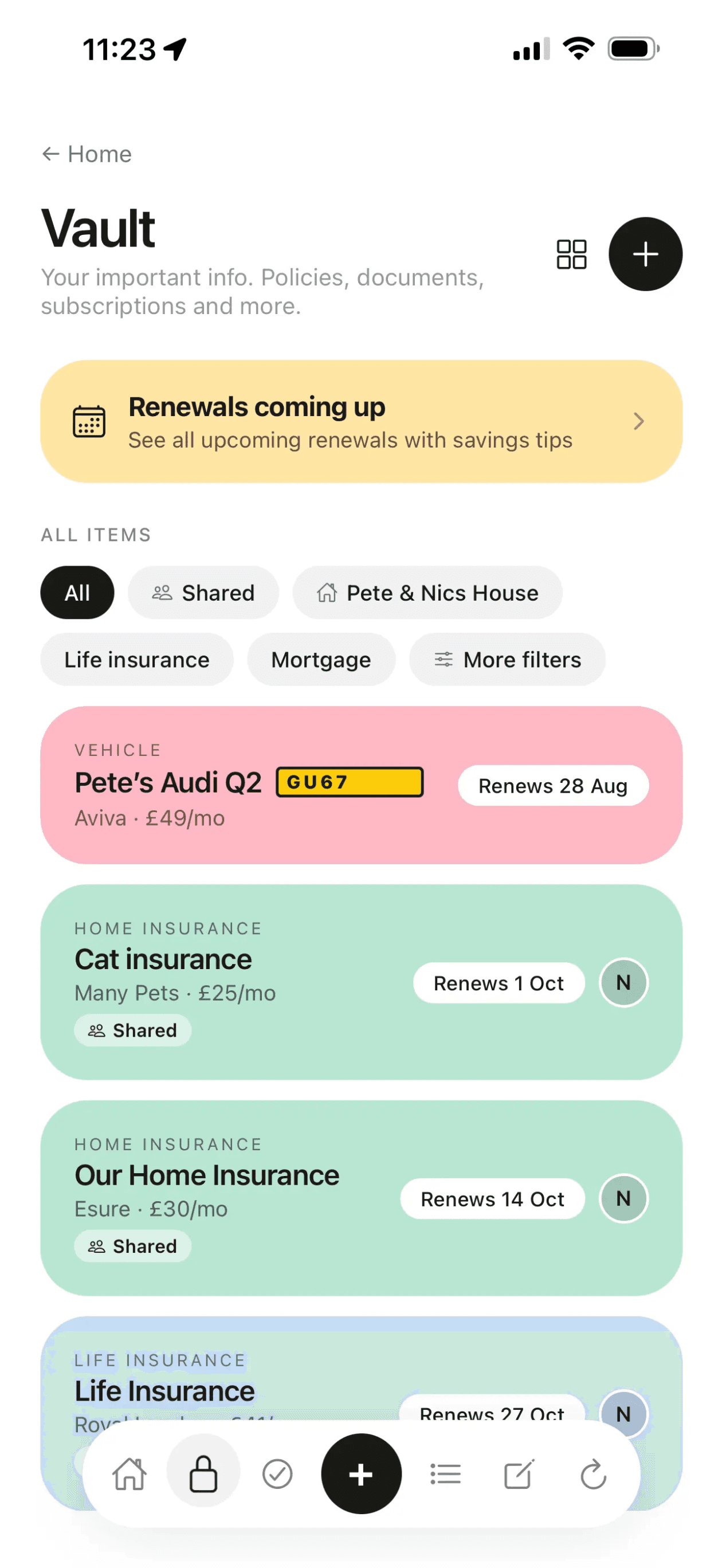
Keep it all in one place.
Roost stores your household details, renewal dates, and emergency info, shared with your partner. Free to start.
What information to store for each type of important document
The specific reference information worth storing varies by document type. Here is what to capture for each category when you are setting up your system:
| Document type | Essential details to store |
|---|---|
| Home insurance | Insurer name, policy number, renewal date, annual premium, excess, claims number (24hr) |
| Car insurance | Insurer, policy number, renewal date, cover level, excess, claims number, named drivers |
| Boiler and heating | Make and model, boiler cover provider and policy number, gas emergency number (0800 111 999), last service date |
| Vehicle | Registration, MOT expiry date, garage used, breakdown cover provider and membership number |
| Mortgage | Lender name, account number, monthly payment, fixed term end date, early repayment charge details |
| Utilities | Supplier names, account numbers, contract end dates, estimated annual costs |
| Appliances | Make, model number, purchase date, warranty end date, manufacturer service number |
| Passport | Expiry date, nationality, issue date (for renewal lead time planning) |
How to organise your home filing system by category
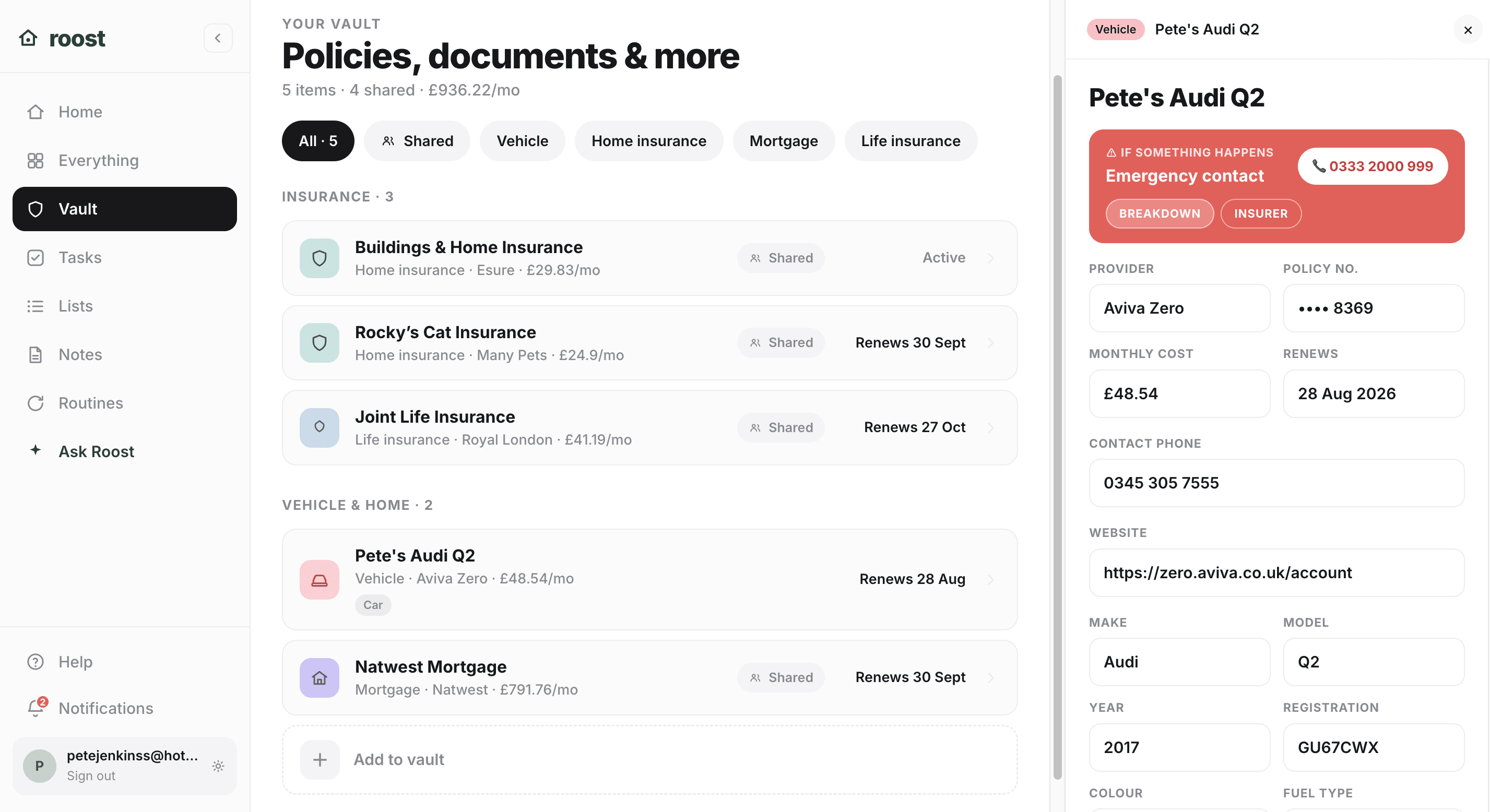
Within each category, the structure should be consistent. For each item, store: what it is, who provides it, the account or policy number, the renewal or expiry date, and the number to call if something goes wrong. That five-point structure covers the vast majority of what you will actually need.
The emergency number is the most commonly forgotten item. When your boiler breaks at 11pm, you do not need the full policy document. You need one phone number. When your car is involved in an accident, you do not need to log in to the insurer's website. You need the claims number saved somewhere you can read while standing at the roadside.
Some categories need a small additional field. For insurance, store the excess separately from the premium, since the excess is the number that determines whether a claim is worth making. For vehicles, store the garage contact alongside the breakdown cover, since the first call after a breakdown is often to the garage rather than the breakdown service. For appliances, store the model number separately, since you will need it when speaking to a manufacturer's service line and it is rarely obvious without the original packaging.
Home filing systems for households and couples
If you live with a partner or family members, document organisation is not just a personal system. It is a shared one. If only one person knows where the home insurance policy is, and that person is ill or away when the boiler breaks, the emergency information is effectively inaccessible.
A shared digital system solves this directly. Both people have access to the same reference information. Neither person has to ask the other for a policy number, a renewal date, or an emergency contact. The practical standard to aim for: your partner should be able to handle any household emergency, renewal, or query without needing to contact you for information.
A good system also means one person does not need to carry the cognitive load of knowing where everything is. When both people can find what they need independently, the knowledge is genuinely shared rather than delegated to the person who set the system up.
Once you have structured your document system, this is what having all the reference information accessible for a single item looks like:
How long should you keep important documents in the UK?
HMRC guidance on keeping records recommends keeping tax and employment records for at least six years, since this is the period during which HMRC can investigate. Beyond that, here are the standard retention periods for common household documents:
| Document type | How long to keep | Reason |
|---|---|---|
| Tax returns and records | At least 6 years | HMRC investigation window |
| Insurance policies | 3 years after expiry | Late claim possibility |
| Mortgage documents | Life of the mortgage | Ongoing legal reference |
| Payslips and P60s | Until state pension confirmed | Pension and NI record verification |
| Bank statements | At least 6 years | Tax and dispute purposes |
| Utility bills | 1 year | Dispute resolution |
| Expired warranties | Discard after expiry | No ongoing purpose |
| Property deeds | Indefinitely | Legal title documentation |
Once a document has passed its retention period and carries no ongoing liability, shredding it is the right call. Keeping irrelevant documents makes the rest harder to find and encourages the junk-drawer problem in the first place.

Common mistakes with home filing systems
Most home filing systems fail for the same reasons. Knowing them makes it easier to avoid them when you set yours up.
Keeping everything. A system that contains every bill, letter, and statement from the past decade is harder to search than one that contains only current, relevant information. Be aggressive about discarding what is past its retention period.
Storing PDFs instead of reference information. A folder full of 30-page policy PDFs does not help you when you need your policy number in under a minute. Store the structured reference information separately. The PDF is a backup, not the system.
Only one person knows where things are. A document system that only one person can navigate is not a household system. It is a single point of failure. The system needs to be accessible to everyone who might need it in an emergency.
Not updating when things change. Insurers change at renewal. Suppliers change. Addresses change. A document system that is not reviewed annually becomes inaccurate quickly, and an inaccurate system is sometimes worse than no system, because it gives false confidence that the information is there.
Using email as a filing system. Searching an email inbox is not the same as having a structured document system. Email works as a delivery mechanism for documents. It does not work as a retrieval system when you are standing at the roadside after a collision and need a policy number in thirty seconds.
Quick recap
- A home filing system covers documents that expire, carry reference numbers needed in emergencies, or have legal obligations
- Keep physical originals in one known location; store reference information (policy numbers, renewal dates, contacts) digitally
- Organise your home filing system by category (insurance, vehicle, property, utilities), not by date
- Both people in a household should be able to navigate the system without asking
- Add renewal dates to a tracker when you set up each entry, not as a separate task
- Review the system once a year and discard anything past its retention period
Frequently asked questions
What is the best way to organise important documents at home?
The most practical system combines digital and physical storage. Store the key details for each document (policy number, renewal date, emergency contact) in a shared digital app or folder so they are searchable and accessible on your phone. Keep physical originals of the handful of documents that need them (passport, birth certificate, property deeds) in a single clearly-labelled folder or box that both people in the household know about. A household admin app like Roost stores this structured reference information per document type, shared across your household.
What important documents should I keep at home in the UK?
Keep documents you might need urgently, documents with expiry dates, and documents with reference numbers you would need in an emergency. This includes: all insurance policies (home, car, life, pet, travel), vehicle documents (MOT history, V5C, breakdown cover), property paperwork (mortgage, tenancy agreement, gas safety certificates), utility account references, appliance warranties, identification documents (passport, driving licence), and financial account references. You do not need to keep every bill or letter, just the reference information.
How long should I keep important documents in the UK?
HMRC recommends keeping tax records for at least six years. Keep insurance policies for three years after they end in case of a late claim. Keep mortgage documents for the life of the mortgage. Keep payslips and P60s until your state pension or tax record is confirmed as correct. Keep utility bills for one year and bank statements for at least six years. For documents that have expired and carry no ongoing liability, shredding them is fine.
Should I store important documents digitally or physically?
Both, with different roles. Physical originals are needed for a small number of documents and should be kept in one place both people in the household know about. Digital storage is better for everything else: it is searchable, accessible when you are away from home, and easy to share. The most important thing is to store the key reference information (policy numbers, renewal dates, contact numbers) somewhere you can access quickly, not just the PDF. A dedicated app or shared folder works better than an email inbox.
The structured half of this system is what Roost's vault is built for: one entry per document type, storing the policy number, renewal date, and emergency contact, shared across your household. Free to start at getroost.io.